
Finding the right balance between sales prospecting and recruitment can be a real challenge, especially in a competitive environment like recruitment agencies.
Between the need to develop your client portfolio and meet recruitment needs, it’s very easy to waste tons of time on repetitive and manual tasks.
In this article, you’ll discover a comprehensive method to automate your client prospecting on Indeed using Apify and Make.
You’ll see how to retrieve data from companies that are hiring, organize it, and leverage it to optimize your sales efforts.
The Business Side: The Heart of Your Operations
Depending on the size and reputation of the agency you work for, you might receive a certain volume of inbound requests.
However, in most cases, you’ll need to actively seek out clients, and this prospecting process requires time and effort.
The goal is clear: build a strong portfolio of clients that you not only acquire but also retain for the long term.
This involves foundational work to identify the right companies, understand their specific needs, and establish a trusting relationship.
It’s a two-step process: continuously attracting new prospects and maintaining a close relationship with your existing clients.
Balancing Act Between Prospecting and Recruiting
In an agency, one of the biggest challenges is finding a balance between managing clients and recruiting candidates.
Juggling the development of your client portfolio and searching for the right profiles for each position can quickly become exhausting, especially when the workload constantly fluctuates.
There are generally three scenarios:
- Too many positions to handle at once: Quality suffers.
- Not enough clients: Your revenue takes a direct hit.
- A stable and regular pace between the two: The ideal situation, but all too rare.
.lSTolIgW_ZrEj46.webp)
Automatically Prospect Clients via Indeed
When it comes to effective prospecting, several tools are at your disposal to identify target companies. Platforms like Sales Navigator allow you to gather lists of prospects, which you can then process with automation solutions like Evaboot, Bardeen, Phantombuster, or LaGrowthMachine.
Websites like Pappers or Société Info provide access to administrative and legal information about companies, which can be useful at certain stages of your strategy.
But here, we’ll focus on a different approach: finding companies based on their job postings on Indeed.
Why Choose Indeed?
Indeed is one of the largest job listing aggregators. When a company is looking to hire, there’s a high chance they’ll post their job on Indeed, making it a rich platform to target companies with an urgent need for new talent.
My Goal:
- Automatically scrape companies that are hiring based on specific criteria.
- Store all this information in a structured database, like Google Sheets or Airtable.
Use Apify to Scrape Indeed
Apify is a powerful platform dedicated to web scraping and online task automation. With Apify, you can create, deploy, and manage scripts designed to gather the data you need without having to understand or write complex code.
Set Up an Actor on Apify
An “actor” on Apify is a script or automated application that performs specific tasks on the web. Actors are used to automate processes like data extraction, data processing, or executing repetitive online tasks.
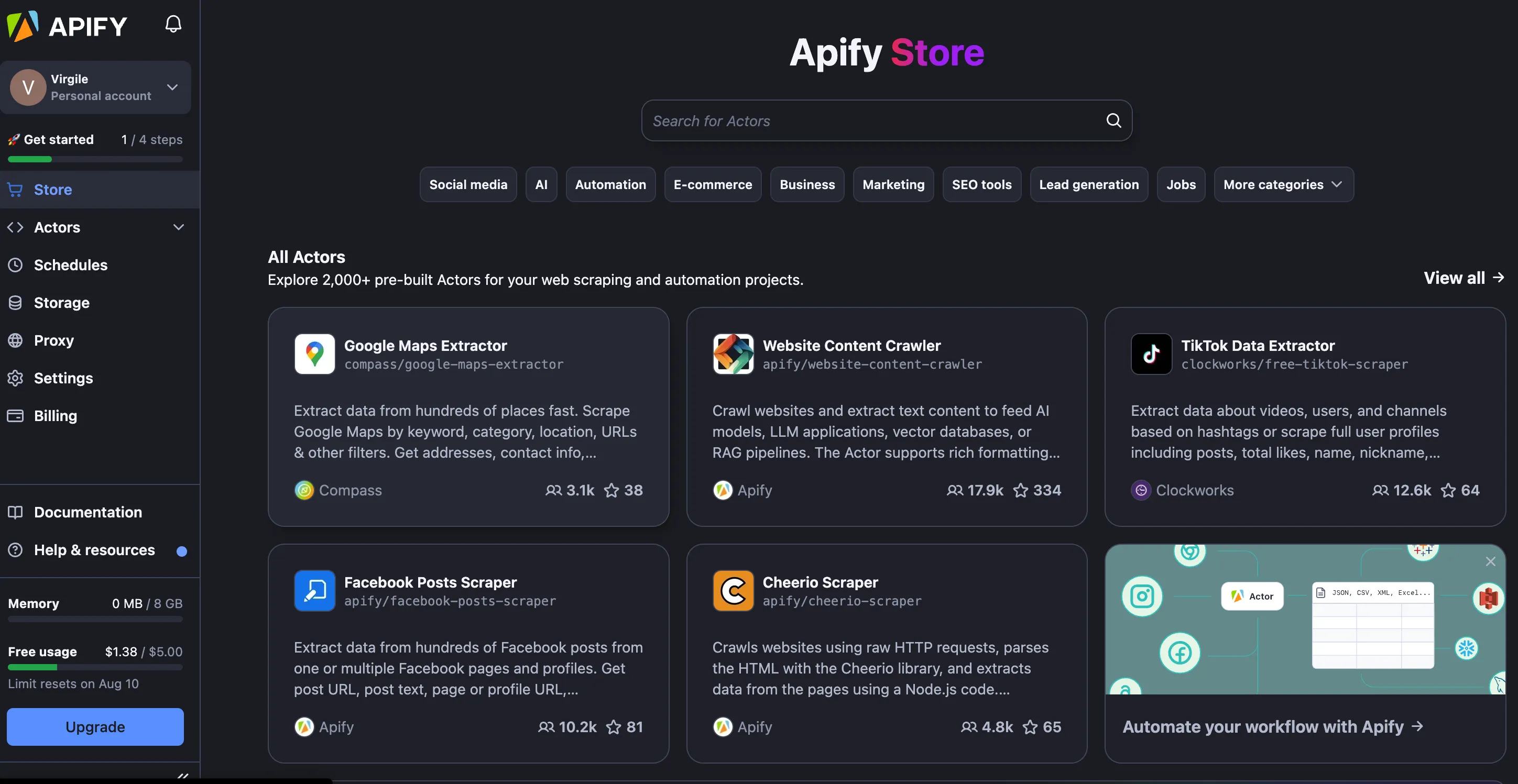
To set up an actor on Apify:
- Access the Apify Store: From the store, you can search for pre-made actors to scrape websites.
- Search for an Indeed Actor: Type “Indeed” in the search bar to find ready-to-use scripts. Choose one with good feedback and ratings.
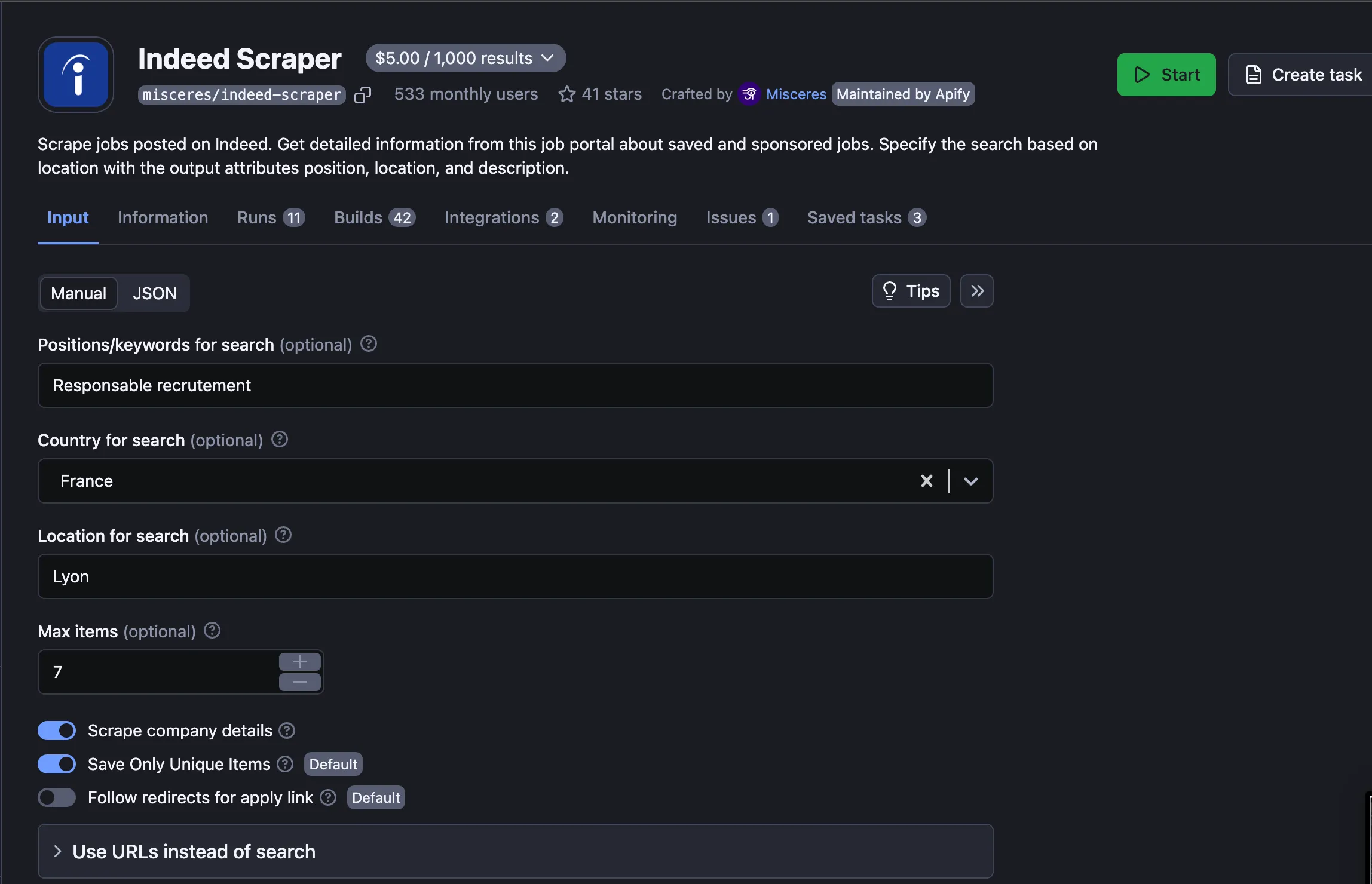
- Configure the Actor: Enter the specific criteria you want to use for scraping (industry, location, job type).
- Run and Schedule the Scraping: You can manually run the actor to scrape data or schedule recurring tasks (e.g., every Monday at 8 AM).
The tool is very intuitive. You’ll find a clear and detailed explanation with a video for each actor.
Trop long, pas lu ?
Le temps est une ressource précieuse. Obtenez les informations dont vous avez besoin en utilisant votre assistant IA préféré.
Create a scenario with Make
Make is an automation tool that allows you to connect different applications and create visual workflows without needing technical skills. It makes integration and implementation of complex processes easy through an intuitive interface.
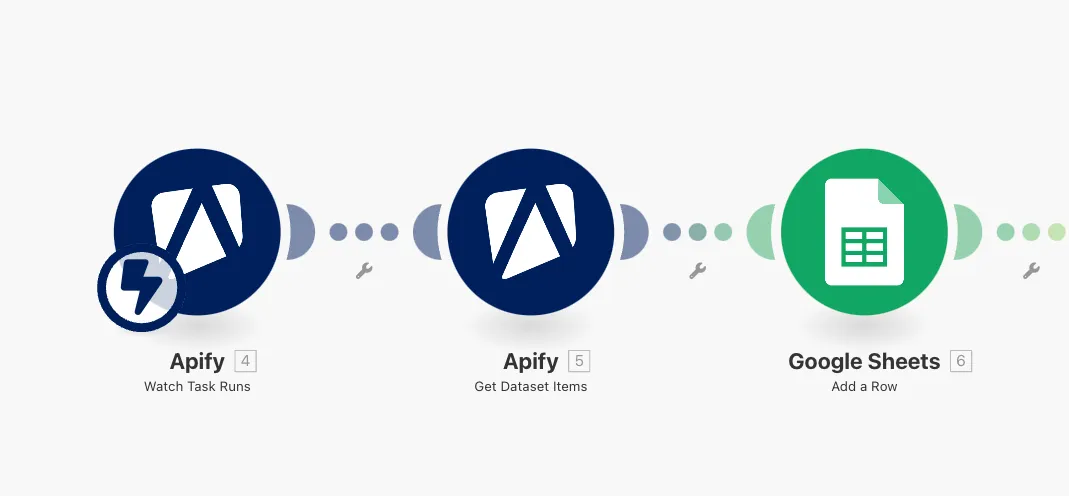
Modules needed for the workflow:
- Apify “Watch Task Runs”: This module triggers automatic actions as soon as the Apify actor starts scraping, retrieving data in real-time.
- Apify “Get Dataset Items”: Retrieves and structures the data collected by the actor to make it usable.
- Data storage: The extracted information (such as companies, job listings, location) is stored in a database like Google Sheets, Notion, or Airtable for optimal management.
- Action automation: Once the data is enriched and stored, other actions can be triggered automatically, such as sending personalized emails or generating reports on new job listings.
Enriching collected data
After retrieving companies that are hiring via Indeed thanks to Apify, it’s essential to maximize this data to make it actionable for your prospecting. At this stage, you have basic information about the companies, but not yet the precise contact details of key decision-makers.
To go further, I use a tool like Rapid API or Datagma to enrich our automation process in Make. With the data obtained via Apify (such as the company name), we’ll automatically search for relevant profiles to contact within each company.
Enrichment steps:
- Use the company names obtained with Apify.
- Add an enrichment module in Make with Datagma or a similar tool.
- Automatically retrieve contact details and key information about relevant profiles, such as the prospect’s email and their complete LinkedIn profile.
Result:
Thanks to this enrichment, you get a complete database, ready to use for your email campaigns or LinkedIn prospecting.
This automated process allows you to save precious time and improve the efficiency of your sales efforts by directly targeting the right people.
💡 To deepen your enrichment strategy, I recommend checking out my article on using Clay, where I detail other powerful methods to enrich your data and automate your workflow even more.
The article link: https://www.jarvi.tech/fr/blog/devient-inarretable-en-recrutement-avec-clay/
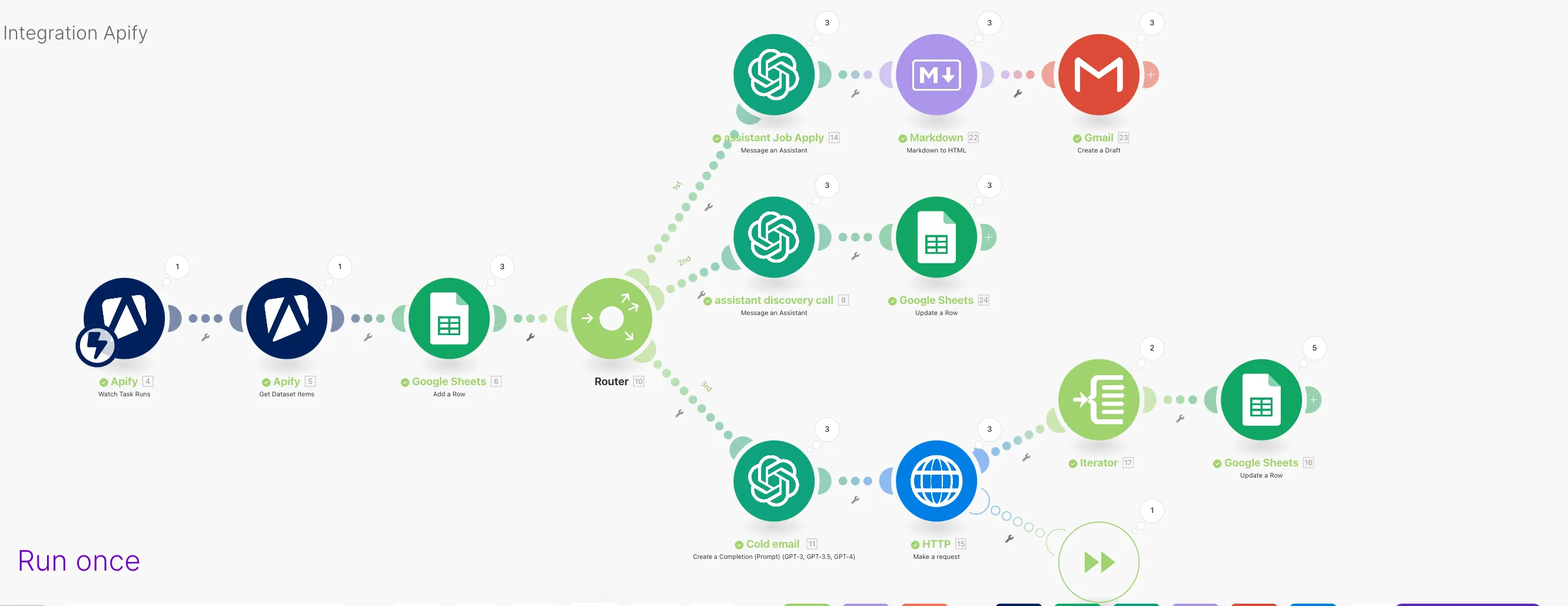
Some examples of possible automation:
-
Automated prospecting email campaign:
Use the data collected via Apify to send personalized prospecting emails. You can use AI tools to automatically generate quality messages from the retrieved information.
-
Job apply assistant:
Set up an assistant that analyzes job offers and automatically applies based on the information in your resume and the job posting criteria. This saves you time by automating the writing of personalized cover letters.
-
Discovery call assistant:
Before your meetings with new prospects, use automation to collect and centralize key information about your contact, identify their pain points, and generate a precise persona to adapt your pitch and ask the right questions.
💡 To maximize the impact of your discovery calls, check out our complete guide on cold calling in recruitment agencies.
Conducting a salary benchmark
Another practical and strategic use of data collected through Indeed automation is conducting salary benchmarks.
Thanks to our Indeed bot and the new directive requiring mandatory salary disclosure in all job postings, you can create real tracking of market trends.
The added value:
- Factual data on compensation to share with your hiring manager and leadership.
- Micro-level market information by region and specific position, offering a granular view of actual salaries.
- A foundation of concrete information that can drive change within your company by adjusting salary offers to stay competitive.
- An excellent way to establish your credibility and position yourself as a strategic advisor to your hiring manager.
💡 Capture the job titles that competitors use when posting ads ⇒ A great way to fuel and expand your sourcing.
Conclusion
Automating your client prospecting on Indeed with Apify and Make saves you valuable time while increasing the effectiveness of your business development efforts.
By integrating these types of tools and scenarios into your daily routine, you free up time to focus on what matters most: building strong relationships with your clients and improving your competitiveness.
To go further, discover how to personalize your prospecting emails with AI prompts in this dedicated article on creating outreach messages.
Article link: https://www.jarvi.tech/fr/blog/emails-prospection-ia/
Related articles

Cold calling for recruitment agencies: 5 techniques to win your mandates
Cold calling remains the ultimate weapon for generating business and signing exclusive mandates. Discover how to transform your sales approach and win more assignments.

Prospecting Emails: Strategies to Capture Attention (with AI)
Finding the right tone and message to grab attention is a constant challenge, especially in sales prospecting. AI can really help, but it requires good mastery for effective results.

How AI Is Reshaping Recruitment Agencies in 2026
Sourcing, screening, prospecting, note-taking... Artificial intelligence is redefining every step of the recruiter's job. An overview of concrete use cases and measurable gains for agencies.
CODE-PLACEHOLDER